AI chatbot
Arizona Water Chatbot
Arizona Water Chatbot
Arizona Water Chatbot
Project
01
Arizona Water Chatbot
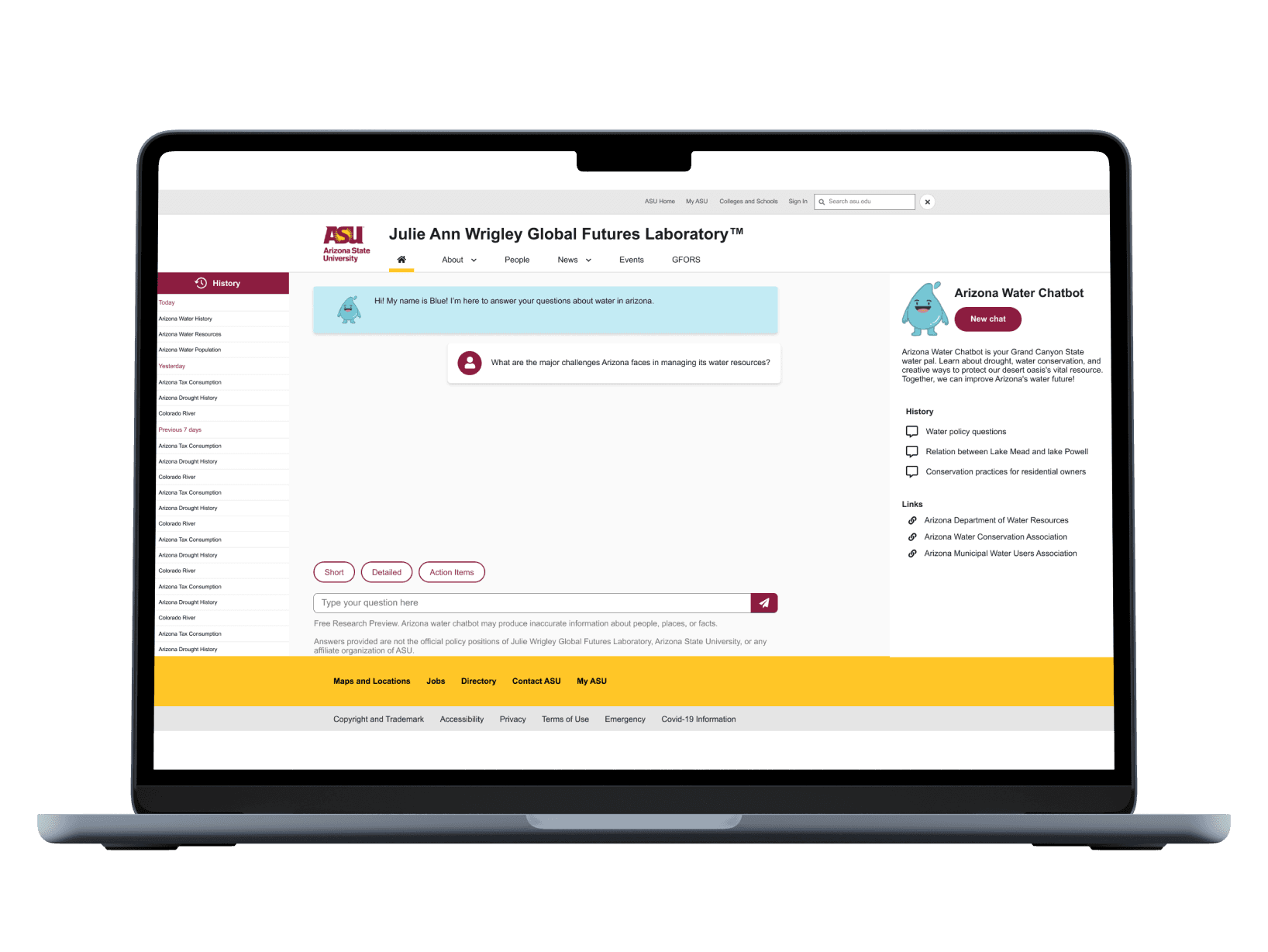
Chatbot for Arizonians to easily access water resources information and get real-time updates on water usage and conservation tips.
For a class during my time in grad school, we were tasked with designing a product focused on improving public access to water resources. My peers and I decided to explore Arizona's water management system as a domain. We conducted user research, designed a conversational interface for a chatbot, and ran usability tests over the course of 4 months. Given the short turnaround, the goal for this project was to understand the common challenges Arizonians face with water information and conservation efforts, and to design a solution that provided quick, accurate, and user-friendly access to vital water resources.
Info
02
Client
Julie Ann Wrigley Lab
Role
UX Researcher, UX Designer,
Usability Testing Moderator,
Usability Testing Observer
Services
User research, Usability testing
Timeline
4 Months
Tools
Figma
Airtable
Miro
Google Suite
Figjam
Overview
03
Problem
Arizona is dealing with serious water challenges caused by rapid growth and a major drop in water supplies. To tackle these issues, decision-makers, stakeholders, and residents need easy-to-use tools that provide fast, reliable information on water resources and conservation efforts.
Solution
I tackled the problem by turning real user frustrations into smart design solutions—crafting a chatbot through deep research, persona-driven design, and continuous testing. The result was an intuitive, engaging, and accessible experience that made water-saving tips easy to find, personalized, and even enjoyable for Arizona residents.
Impact
04
Impact Highlights
Quantitative insights from surveys, interviews, and usability testing helped shape a more accessible, user-friendly chatbot that empowers Arizona residents with reliable water conservation information.
Collected targeted survey data from over 45 Arizona residents to identify challenges in accessing water conservation info and key feature expectations from a chatbot.
45+ Survey Responses
Conducted semi-structured interviews with students, homeowners, and eco-conscious residents to gather qualitative insights and define user personas.
10+ User Interviews
Iteratively tested the chatbot with users, identifying issues such as unclear restart functions, overwhelming responses, and trust concerns.
Usability Testing Rounds
Applied Nielsen’s 10 usability heuristics to improve conversational flow, navigation clarity, and reduce interaction errors.
Heuristic Evaluation
Benchmarked against existing government and conservation tools to identify gaps in personalization and clarity, driving design differentiation.
Competitive Analysis
Emphatize
Define
Ideate
Design
Test
User Research
User Interview
Entrant Analysis
User Persona
User Jouney Map
Goal Statement
Empathy Map
Brainstorming
User Flow
Wireframes
Visual Design
Prototype
Check Usability
Survey Insight
Improvements
Design Process
05
Design Process
Overview
The users that participated in the survey, interview,
task analysis, and usability testing were actual
users selected on the basis of:
1.frequency of using with water chabot
2.demographic factors such as age, location,
houseowner (if any)
3.experience using the chatbot
User Research
06
User Research
Session
To validate the challenges and refine the problem statement, we interviewed 15 users and observed how they searched for water-related information. We also distributed surveys and conducted task analysis to gain deeper insights into their needs and behaviors when accessing water resources.
Where?
We engaged with users at residentials community in Arizona, where residents commonly seek water information. These locations provided valuable insights into how the chatbot could best serve their needs.
We interacted with people from diverse backgrounds, considering their water usage habits, demographic factors, and experience with accessing water resources.
Who?
Different users had varying challenges. On a high level, there were common issues faced by the majority.
What?
User Flow
08
In order to design the best experience, I’ve look at the possible paths the user might take during their journey and examine what happens during each step.
User
Query
User
Query
Chatbot
Reply
User
Query
Chatbot
Reply
User
Query
Chatbot
Reply
User Personas
07
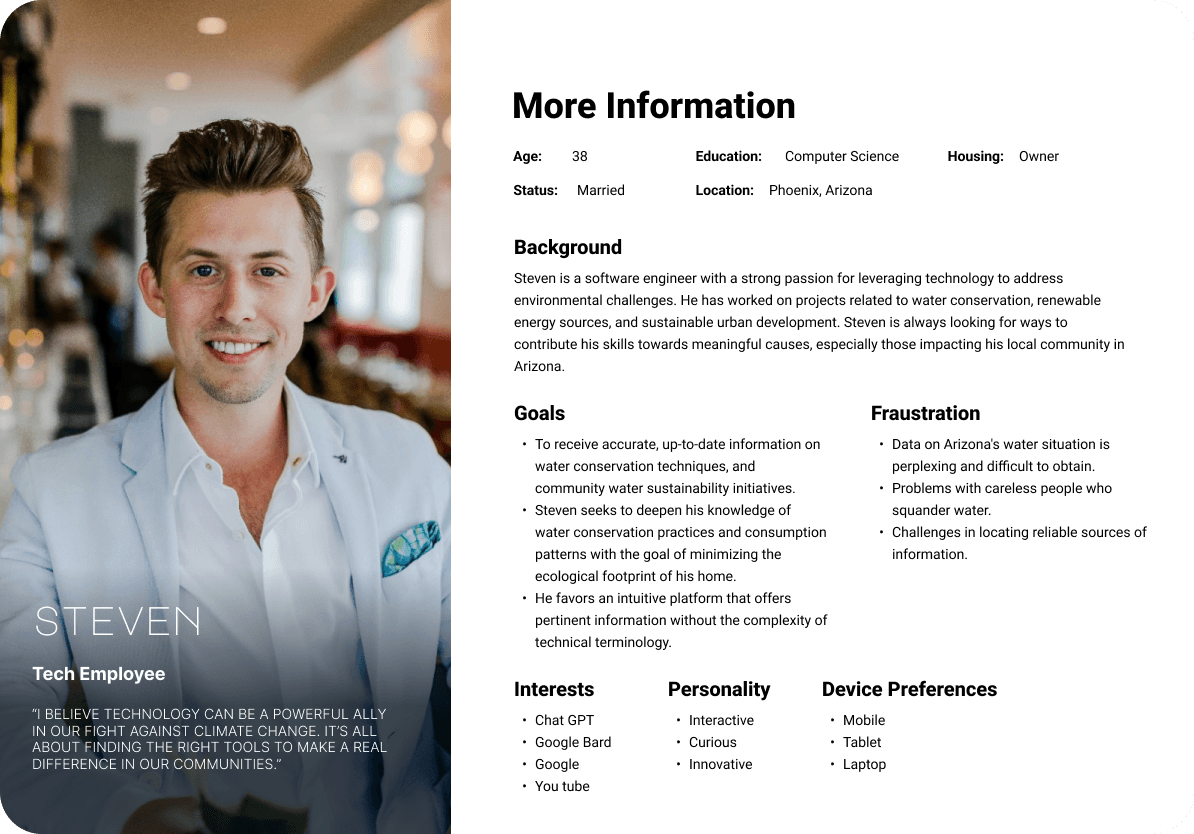
From the research findings, we created a user persona representing an Arizona resident who has owned a home in the state for over 10 years. This persona helped us better understand the needs and concerns of long-term homeowners regarding water usage and conservation.
User Story Interaction
Brainstroming
09
After identifying key pain points, we prioritized resolving them iteratively to enhance the user experience of the Arizona Water Chatbot. Our design approach focused on reducing cognitive load and improving accessibility for all users.
Research Results & Findings
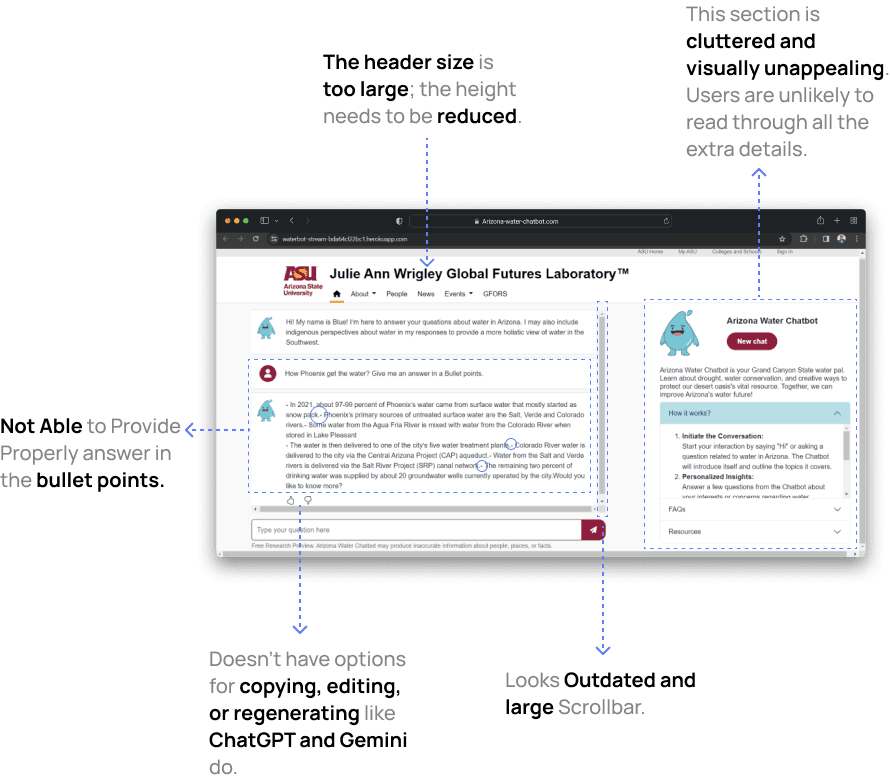
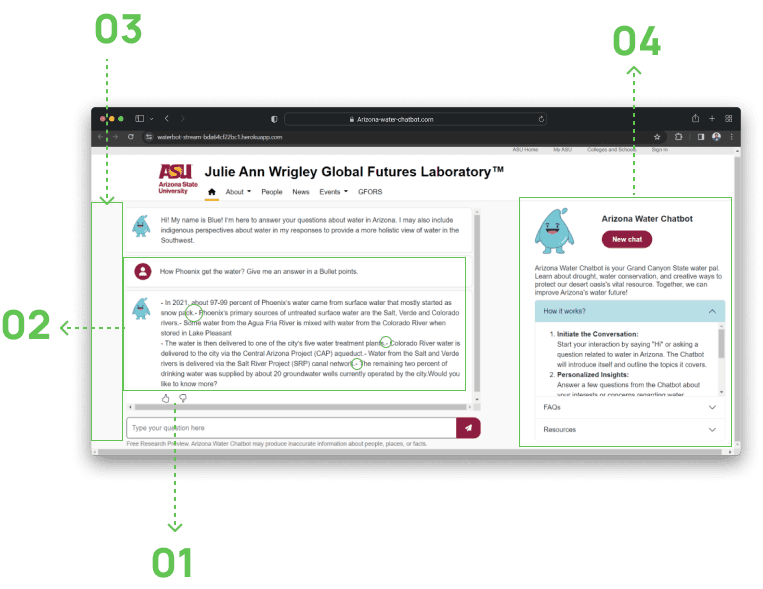
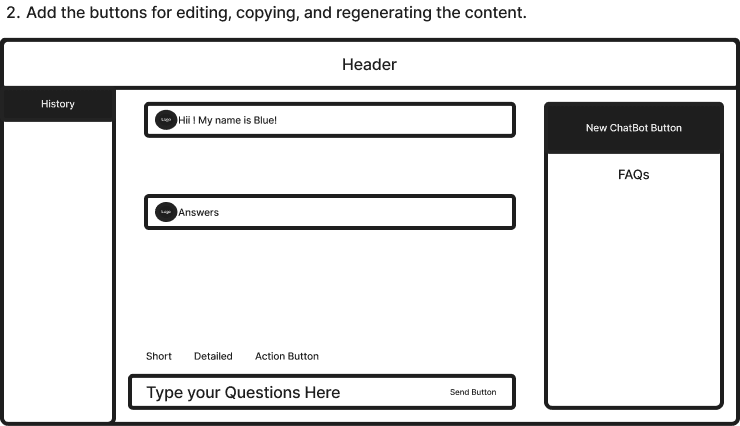
Essential functions like "Edit," "Copy," and "Regenerate" were missing from the chatbot interface, limiting users' ability to interact efficiently and make quick adjustments to their queries.
Missing Key Buttons
01
Essential functions like "Edit," "Copy," and "Regenerate" were missing from the chatbot interface, limiting users' ability to interact efficiently and make quick adjustments to their queries.
Inability to Provide Bullet-Pointed Answers
02
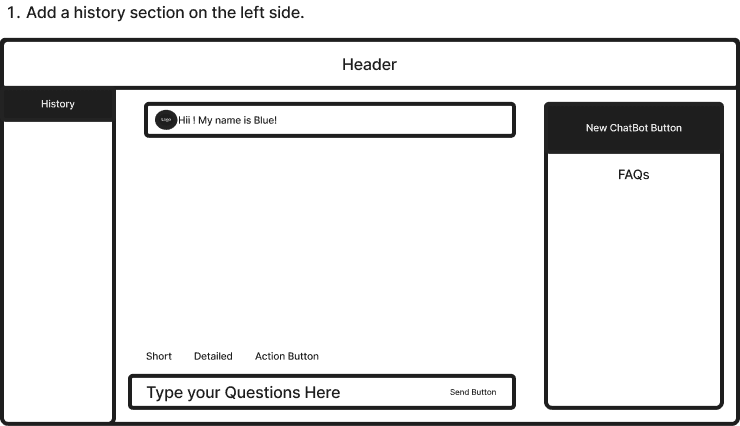
The chatbot lacked a history section, preventing users from reviewing their past interactions, which would be helpful for tracking previous inquiries and responses.
No History Section
03
The overall UI design lacked the polished and intuitive feel found in other AI chatbots, making it less user-friendly and visually appealing for users.
Inconsistent UI
04
Design Direction
10
Providing Flexibility to Users
Offering various response options significantly enhanced the experience.
A prominent feature is its capacity to present users with varied response types: Detailed, Concise, and Actionable Steps.
Redesign Sketches
11
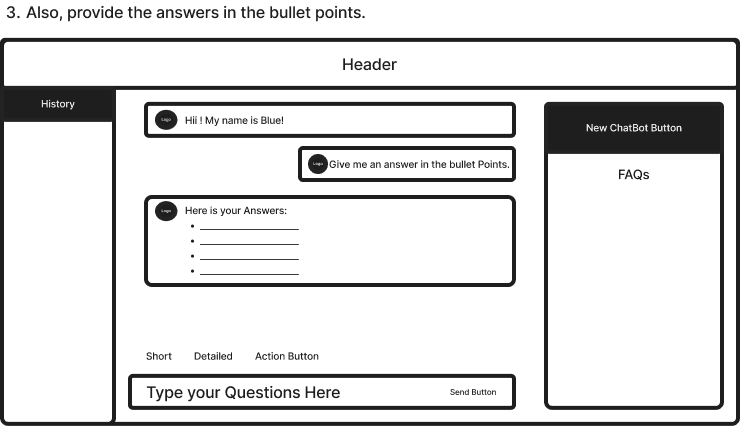
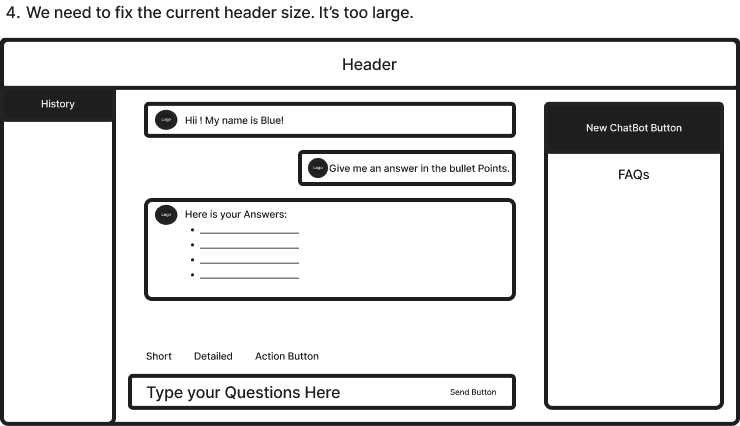
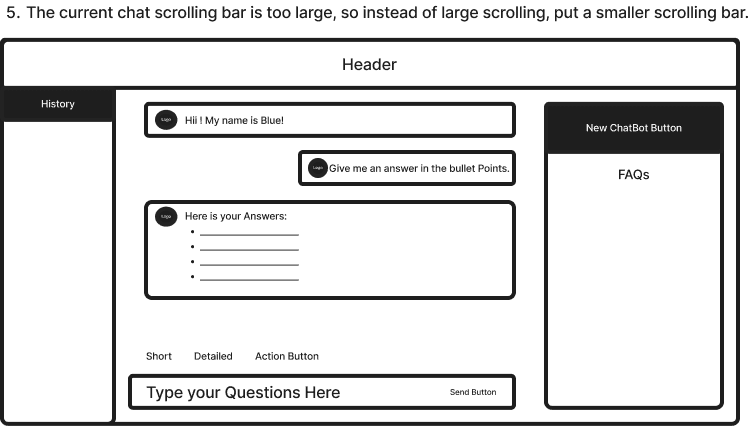
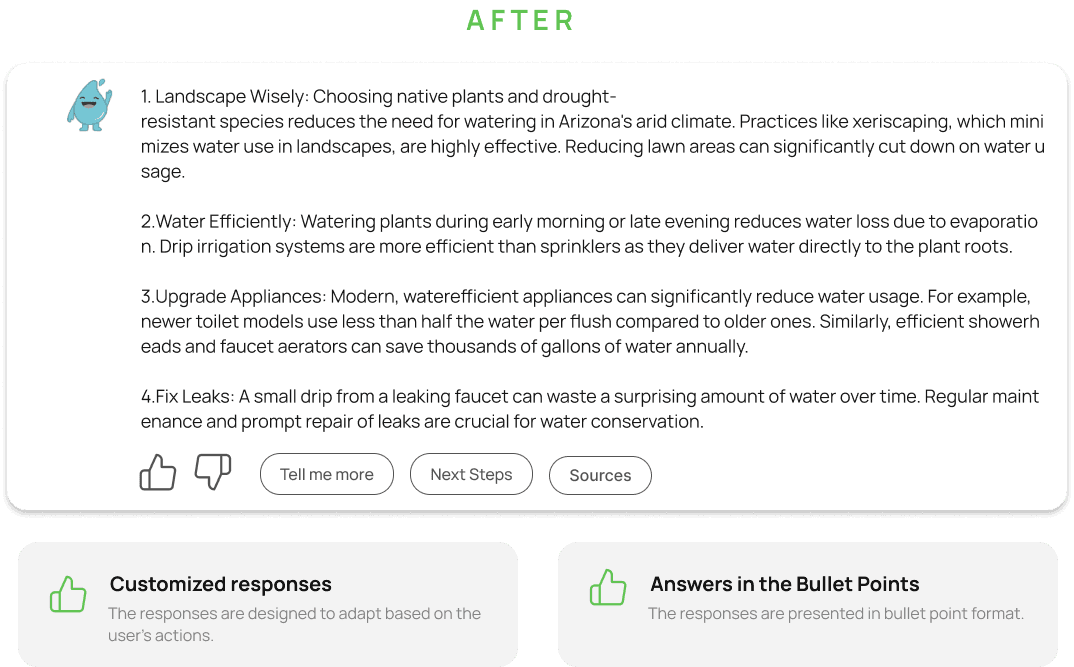
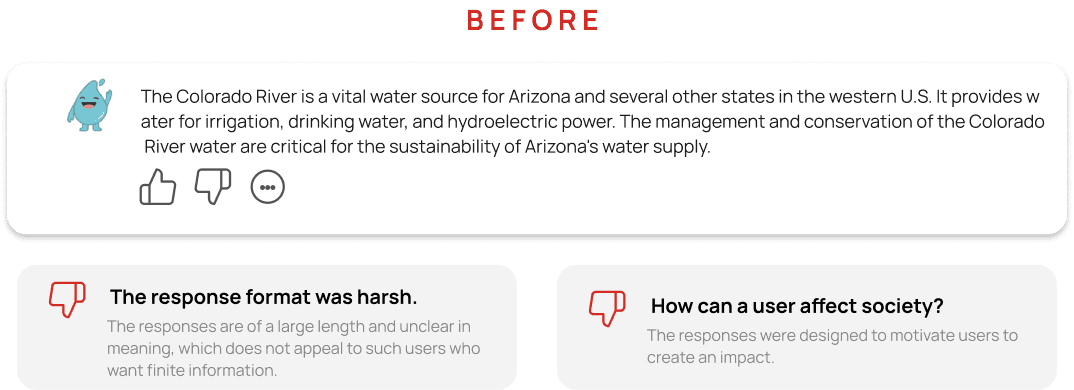
All the final features!
12
All the final features!/Post-test Visuals
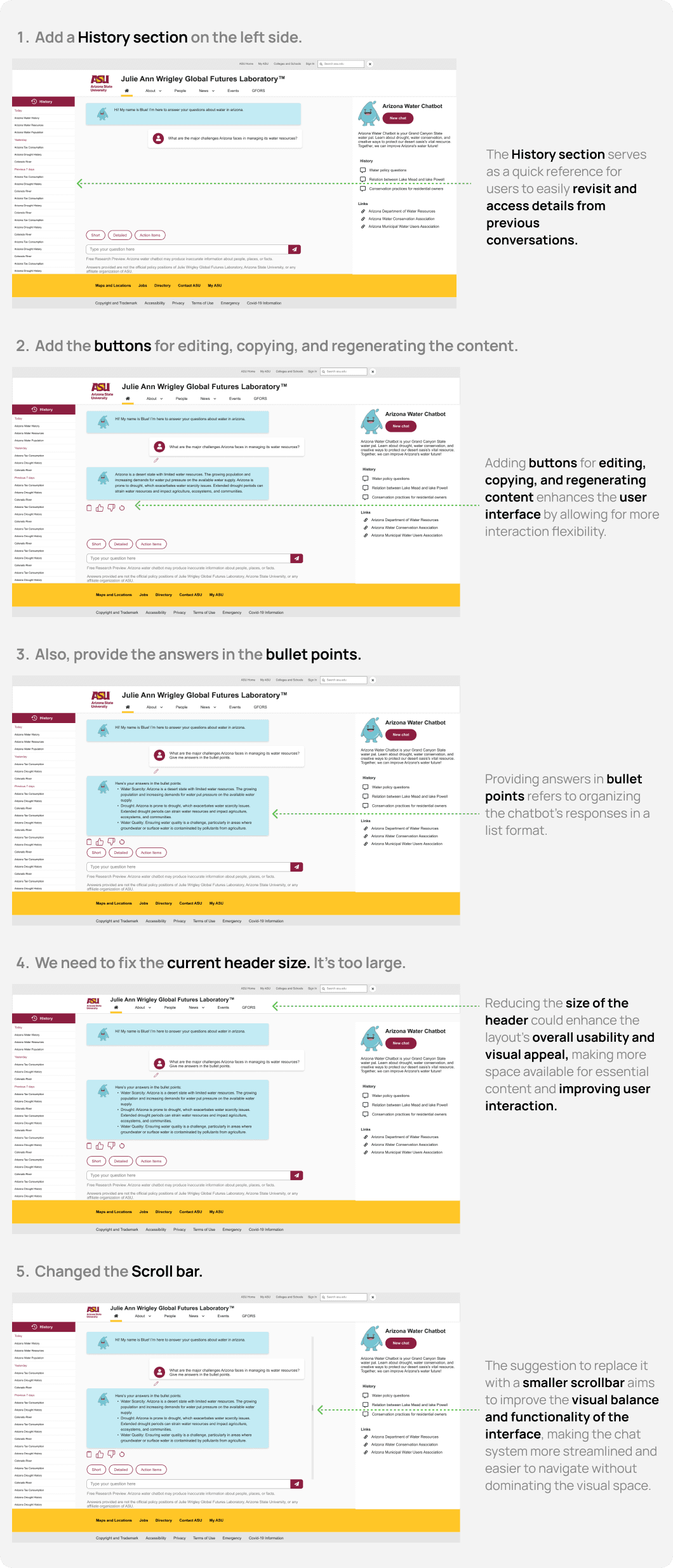
Key Findings
13
Key Findings
1.Consistency and Clarity: Responses should consistently be clear, accurate, and easy to understand, regardless of the complexity of the inquiry.
2.Navigation and Flexibility: Users should find it easy to start new conversations, switch topics, or seek further clarification without feeling stuck in a rigid conversation flow.
3.Engagement and Trust: The ability to provide feedback and see that it has an impact encourages ongoing engagement and builds trust in the chatbot as a reliable resource.
4.Accessibility of Information: Information provided should be accessible to a wide audience, with technical terms explained and actionable advice that is easy to follow.
Key Learnings
14
What did I learn?
1.There are many things to say about qualitative data.
I learned how to solve issues through coding and discussions with stakeholders and target users.
2.Don't overlook accessibility.
We can increase the number of chatbot interactions and engagement sessions by integrating speech to text inputs.
3.Visuals aren't always important!
Through extensive research and numerous user conversations, we were able to guarantee learnability and awareness in Conversational UI.
Project
01
Arizona Water Chatbot
Chatbot for Arizonians to easily access water resources information and get real-time updates on water usage and conservation tips.
For a class during my time in grad school, we were tasked with designing a product focused on improving public access to water resources. My peers and I decided to explore Arizona's water management system as a domain. We conducted user research, designed a conversational interface for a chatbot, and ran usability tests over the course of 4 months. Given the short turnaround, the goal for this project was to understand the common challenges Arizonians face with water information and conservation efforts, and to design a solution that provided quick, accurate, and user-friendly access to vital water resources.
Info
02
Client
Julie Ann Wrigley Lab
Role
UX Researcher, UX Designer,
Usability Testing Moderator,
Usability Testing Observer
Services
User research, Usability testing
Timeline
4 Months
Tools
Figma
Airtable
Miro
Google Suite
Figjam
Overview
03
Problem
Arizona is dealing with serious water challenges caused by rapid growth and a major drop in water supplies. To tackle these issues, decision-makers, stakeholders, and residents need easy-to-use tools that provide fast, reliable information on water resources and conservation efforts.
Solution
I tackled the problem by turning real user frustrations into smart design solutions—crafting a chatbot through deep research, persona-driven design, and continuous testing. The result was an intuitive, engaging, and accessible experience that made water-saving tips easy to find, personalized, and even enjoyable for Arizona residents.
Impact
04
Collected targeted survey data from over 45 Arizona residents to identify challenges in accessing water conservation info and key feature expectations from a chatbot.
45+ Survey Responses
Conducted semi-structured interviews with students, homeowners, and eco-conscious residents to gather qualitative insights and define user personas.
10+ User Interviews
Iteratively tested the chatbot with users, identifying issues such as unclear restart functions, overwhelming responses, and trust concerns.
Usability Testing Rounds
Applied Nielsen’s 10 usability heuristics to improve conversational flow, navigation clarity, and reduce interaction errors.
Heuristic Evaluation
Benchmarked against existing government and conservation tools to identify gaps in personalization and clarity, driving design differentiation.
Competitive Analysis
Impact Highlights
Quantitative insights from surveys, interviews, and usability testing helped shape a more accessible, user-friendly chatbot that empowers Arizona residents with reliable water conservation information.
Emphatize
Define
Ideate
Design
Test
User Research
User Interview
Entrant Analysis
User Persona
User Jouney Map
Goal Statement
Empathy Map
Brainstorming
User Flow
Wireframes
Visual Design
Prototype
Check Usability
Survey Insight
Improvements
Design Process
05
Design Process
Overview
The users that participated in the survey, interview,
task analysis, and usability testing were actual
users selected on the basis of:
1.frequency of using with water chabot
2.demographic factors such as age, location,
houseowner (if any)
3.experience using the chatbot
User Research
06
User Research Session
To validate the challenges and refine the problem statement, we interviewed 15 users and observed how they searched for water-related information. We also distributed surveys and conducted task analysis to gain deeper insights into their needs and behaviors when accessing water resources.
Where?
We engaged with users at residentials community in Arizona, where residents commonly seek water information. These locations provided valuable insights into how the chatbot could best serve their needs.
We interacted with people from diverse backgrounds, considering their water usage habits, demographic factors, and experience with accessing water resources.
Who?
Different users had varying challenges. On a high level, there were common issues faced by the majority.
What?
User Flow
08
In order to design the best experience, I’ve look at the possible paths the user might take during their journey and examine what happens during each step.
User
Query
User
Query
Chatbot
Reply
User
Query
Chatbot
Reply
User
Query
Chatbot
Reply
User Personas
07
From the research findings, we created a user persona representing an Arizona resident who has owned a home in the state for over 10 years. This persona helped us better understand the needs and concerns of long-term homeowners regarding water usage and conservation.
User Story Interaction
Brainstroming
09
After identifying key pain points, we prioritized resolving them iteratively to enhance the user experience of the Arizona Water Chatbot. Our design approach focused on reducing cognitive load and improving accessibility for all users.
Research Results &
Findings
Essential functions like "Edit," "Copy," and "Regenerate" were missing from the chatbot interface, limiting users' ability to interact efficiently and make quick adjustments to their queries.
Missing Key Buttons
01
Essential functions like "Edit," "Copy," and "Regenerate" were missing from the chatbot interface, limiting users' ability to interact efficiently and make quick adjustments to their queries.
Inability to Provide Bullet-Pointed Answers
02
The chatbot lacked a history section, preventing users from reviewing their past interactions, which would be helpful for tracking previous inquiries and responses.
No History Section
03
The overall UI design lacked the polished and intuitive feel found in other AI chatbots, making it less user-friendly and visually appealing for users.
Inconsistent UI
04
Design Direction
10
Providing Flexibility
to Users
Offering various response options significantly enhanced the experience.
A prominent feature is its capacity to present users with varied response types: Detailed, Concise, and Actionable Steps.
Redesign Sketches
11
All the final features!
12
All the final features!/Post-test Visuals
Key Findings
13
Key Findings
1.Consistency and Clarity: Responses should consistently be clear, accurate, and easy to understand, regardless of the complexity of the inquiry.
2.Navigation and Flexibility: Users should find it easy to start new conversations, switch topics, or seek further clarification without feeling stuck in a rigid conversation flow.
3.Engagement and Trust: The ability to provide feedback and see that it has an impact encourages ongoing engagement and builds trust in the chatbot as a reliable resource.
4.Accessibility of Information: Information provided should be accessible to a wide audience, with technical terms explained and actionable advice that is easy to follow.
Key Learnings
14
What did I learn?
1.There are many things to say about qualitative data.
I learned how to solve issues through coding and discussions with stakeholders and target users.
2.Don't overlook accessibility.
We can increase the number of chatbot interactions and engagement sessions by integrating speech to text inputs.
3.Visuals aren't always important!
Through extensive research and numerous user conversations, we were able to guarantee learnability and awareness in Conversational UI.
Project
01
Arizona Water Chatbot
Chatbot for Arizonians to easily access water resources information and get real-time updates on water usage and conservation tips.
For a class during my time in grad school, we were tasked with designing a product focused on improving public access to water resources. My peers and I decided to explore Arizona's water management system as a domain. We conducted user research, designed a conversational interface for a chatbot, and ran usability tests over the course of 4 months. Given the short turnaround, the goal for this project was to understand the common challenges Arizonians face with water information and conservation efforts, and to design a solution that provided quick, accurate, and user-friendly access to vital water resources.
Info
02
Client
Julie Ann Wrigley Lab
Role
UX Researcher, UX Designer,
Usability Testing Moderator,
Usability Testing Observer
Services
User research, Usability testing
Timeline
4 Months
Tools
Figma
Airtable
Miro
Google Suite
Figjam
Overview
03
Problem
Arizona is dealing with serious water challenges caused by rapid growth and a major drop in water supplies. To tackle these issues, decision-makers, stakeholders, and residents need easy-to-use tools that provide fast, reliable information on water resources and conservation efforts.
Solution
I tackled the problem by turning real user frustrations into smart design solutions crafting a chatbot through deep research, persona-driven design, and continuous testing. The result was an intuitive, engaging, and accessible experience that made water-saving tips easy to find, personalized, and even enjoyable for Arizona residents.
Impact
04
Collected targeted survey data from over 45 Arizona residents to identify challenges in accessing water conservation info and key feature expectations from a chatbot.
45+ Survey Responses
Conducted semi-structured interviews with students, homeowners, and eco-conscious residents to gather qualitative insights and define user personas.
10+ User Interviews
Iteratively tested the chatbot with users, identifying issues such as unclear restart functions, overwhelming responses, and trust concerns.
Usability Testing Rounds
Applied Nielsen’s 10 usability heuristics to improve conversational flow, navigation clarity, and reduce interaction errors.
Heuristic Evaluation
Benchmarked against existing government and conservation tools to identify gaps in personalization and clarity, driving design differentiation.
Competitive Analysis
Impact Highlights
Quantitative insights from surveys, interviews, and usability testing helped shape a more accessible, user-friendly chatbot that empowers Arizona residents with reliable water conservation information.
Emphatize
Define
Ideate
Design
Test
User Research
User Interview
Entrant Analysis
User Persona
User Jouney Map
Goal Statement
Empathy Map
Brainstorming
User Flow
Wireframes
Visual Design
Prototype
Check Usability
Survey Insight
Improvements
Design Process
05
Design Process
Overview
The users that participated in the survey, interview,
task analysis, and usability testing were actual
users selected on the basis of:
1.frequency of using with water chabot
2.demographic factors such as age, location,
houseowner (if any)
3.experience using the chatbot
User Research
06
User Research Session
To validate the challenges and refine the problem statement, we interviewed 15 users and observed how they searched for water-related information. We also distributed surveys and conducted task analysis to gain deeper insights into their needs and behaviors when accessing water resources.
Where?
We engaged with users at residentials community in Arizona, where residents commonly seek water information. These locations provided valuable insights into how the chatbot could best serve their needs.
We interacted with people from diverse backgrounds, considering their water usage habits, demographic factors, and experience with accessing water resources.
Who?
Different users had varying challenges. On a high level, there were common issues faced by the majority.
What?
User Personas
07
From the research findings, we created a user persona representing an Arizona resident who has owned a home in the state for over 10 years. This persona helped us better understand the needs and concerns of long-term homeowners regarding water usage and conservation.
User Story Interaction
User Flow
08
In order to design the best experience, I’ve look at the possible paths the user might take during their journey and examine what happens during each step.
User
Query
User
Query
Chatbot
Reply
User
Query
Chatbot
Reply
User
Query
Chatbot
Reply
Brainstroming
09
After identifying key pain points, we prioritized resolving them iteratively to enhance the user experience of the Arizona Water Chatbot. Our design approach focused on reducing cognitive load and improving accessibility for all users.
Research Results &
Findings
Essential functions like "Edit," "Copy," and "Regenerate" were missing from the chatbot interface, limiting users' ability to interact efficiently and make quick adjustments to their queries.
Missing Key Buttons
01
Essential functions like "Edit," "Copy," and "Regenerate" were missing from the chatbot interface, limiting users' ability to interact efficiently and make quick adjustments to their queries.
Inability to Provide Bullet-Pointed Answers
02
The chatbot lacked a history section, preventing users from reviewing their past interactions, which would be helpful for tracking previous inquiries and responses.
No History Section
03
The overall UI design lacked the polished and intuitive feel found in other AI chatbots, making it less user-friendly and visually appealing for users.
Inconsistent UI
04
Design Direction
10
Providing Flexibility
to Users
Offering various response options significantly enhanced the experience.
A prominent feature is its capacity to present users with varied response types: Detailed, Concise, and Actionable Steps.
Redesign Sketches
11
All the final features!
12
All the final features!/Post-test Visuals
Key Findings
13
Key Findings
1.Consistency and Clarity: Responses should consistently be clear, accurate, and easy to understand, regardless of the complexity of the inquiry.
2.Navigation and Flexibility: Users should find it easy to start new conversations, switch topics, or seek further clarification without feeling stuck in a rigid conversation flow.
3.Engagement and Trust: The ability to provide feedback and see that it has an impact encourages ongoing engagement and builds trust in the chatbot as a reliable resource.
4.Accessibility of Information: Information provided should be accessible to a wide audience, with technical terms explained and actionable advice that is easy to follow.
Key Learnings
14
What did I learn?
1.There are many things to say about qualitative data.
I learned how to solve issues through coding and discussions with stakeholders and target users.
2.Don't overlook accessibility.
We can increase the number of chatbot interactions and engagement sessions by integrating speech to text inputs.
3.Visuals aren't always important!
Through extensive research and numerous user conversations, we were able to guarantee learnability and awareness in Conversational UI.